YBA Skins Tier List Maker (July 2026): Rank Every Skin Free

YBA skins Tier List is a free interactive tier list maker on Tier List Maker. Drag and drop 204 images across 5 ranking tiers (S, A, B, C, D), customize everything, then download or share your ranking — no login and no watermark.
Features of this tier list maker:
- Drag & drop ranking — Drag any image from the pool into a tier and drag between tiers to re-rank; the × on an image inside a tier sends it back to the pool.
- Download Tier List — Save the finished tier list as a PNG image that matches the on-screen design exactly — free, no watermark.
- Share Tier List — Publish the ranking to its own share page with a link, emoji reactions, social buttons and comments.
- ✨ AI Generate from AI — Paste a tier list generated with ChatGPT or any AI assistant and it is built instantly, items pre-placed in their tiers.
- Embed — Copy an iframe snippet and embed the interactive tier list in any website or blog.
- Add images — Upload your own images from your device and rank them alongside the template images.
- Add text — design studio — Create text cards or draw custom items with pen, spray, shapes, emoji stamps, fill bucket, styled text and uploaded images; every object can be moved, resized and rotated.
- Add Tier & tier editing — Add, rename, recolor, reorder or delete tiers to build any ranking scale.
- Reset — Send every image back to the pool and start the ranking over.
- ⛔ Report — Send the site owner a suggestion for new images or changes to this template.
- Fullscreen — Pin the tool to the whole window for distraction-free ranking.
Tiers: S, A, B, C, D
The 204 images in this template: actiomn-figure-spjpg, aeroohjpg, aerosljpg, all-star-cmoonjpg, all-starjpg, all-star-mihjpg, anusredjpg, aot-anubisjpg, asuna-scrjpg, asunajpg, azure-spjpg, baseball-spjpg, baseball-sptwjpg, bible-gejpg, bible-gerjpg, black-hgjpg, black-thjpg, blue-her-ppljpg, blue-twjpg, blue-twohjpg, boejpg, borosjpg, casualjpg, ccmihjpg, ccmoonjpg, ccqjpg, ccws2jpg, cd-idkjpg, cd-leg2jpg, cmjpg, cqbtdjpg, cracked-twaujpg, crazy-idoljpg, cvenomjpg, ddtjpg, dead-gejpg, dead-gerjpg, deimjpg, deimos-cmoonjpg, deimos-kqbtdjpg, deimos-kqjpg, deimos-mihjpg, deimos-wsjpg, devil4cjpg, devil4cltjpg, dmihjpg, dmoon2jpg, dsptwjpg, eanddjpg, eldrich-herjpg, elejpg, emperjpg, ender-kcjpg, ender-kcrjpg, eneljpg, ew-mihjpg, femtwaujpg, festive-freejpg, festivesptwjpg, fostjpg, frostjpg, ftwjpg, ftwohjpg, gempererjpg, gfdbjpg, ghostfacejpg, glacsjpg, glock-fadejpg, glockjpg, gray-rapier-scrjpg, gray-rapierjpg, gray-tuteljpg, green-spjpg, green-sptwjpg, grerjpg, gtwoh3jpg, ha4jpg, headhunterjpg, heaven-gejpg, heaven-gerjpg…
Last updated: July 16, 2026 By Adam Levign
You just rolled a skin you’ve never heard of, or someone offered you a trade and you have no idea if you’re getting ripped off. That’s usually the moment people end up searching for a YBA skins tier list, not out of idle curiosity, but because they need to make a call in the next five minutes. I’ve had a trade window open on “Go/Jo” with no idea what it was worth, watching the other person’s patience run out in real time.
Most tier lists you’ll find for Your Bizarre Adventure (YBA) skins are static: someone else’s opinion, frozen at whatever patch they wrote it for, with no way to check it against your own taste or update it yourself. This page works differently. Below is a live, preloaded YBA skins tier list template with every current skin already added as an image, ready to drag straight into tiers. No uploading, no account, no signup.
Try the Interactive YBA Skins Tier List Template
The template on this page comes loaded with images of the current YBA skins already added, so you can start dragging them into S, A, B, C, and D (or whatever tiers you want) the second the page loads. You’re not starting from a blank board and hunting down skin images yourself. That part’s already done.
How to use YBA Skins Tier List Maker template
Think about what you’re actually trying to answer before you start dragging things around. If you’re deciding whether a trade is fair, sort by trading value first, put the skins you know are in demand up top, and the common reskins at the bottom. If you’re just organizing your own collection by how much you like the way they look, ignore value entirely and rank by vibes. You can even build both: rename one tier row “Trade Value” and rank a second board by “Looks,” since nothing locks you into a single ranking system here.
Customize YBA Skins Tier List your way
The board isn’t fixed to five tiers or fixed labels. You can add or remove tiers, rename any of them (swap “S” for “Meta” or “Grail” if that’s how your friend group talks about skins), set a custom background color and text color per tier, and reorder tiers by dragging them up or down. If you want to start over, there’s a reset option for the whole board. And if a skin you own isn’t in the preloaded set yet, clicking Create opens a full editor, comparable to a lightweight paint program, with a pen tool, shape tools, eraser, undo/redo, and a text tool with bold, italic, and alignment options, so you can draw your own item, upload a screenshot and mark it up, or add text labels directly onto any image.
YBA Skin Tier List Explained: What the Tiers Mean
Most tier systems for YBA skins run from S (or X) down to D or F, based primarily on trading value and rarity, not on how good a skin looks. A skin can be genuinely ugly and still sit in S tier because very few people have it, and a skin can look incredible and sit lower because it’s common. That distinction trips people up constantly, so it’s worth stating plainly before looking at any actual rankings.
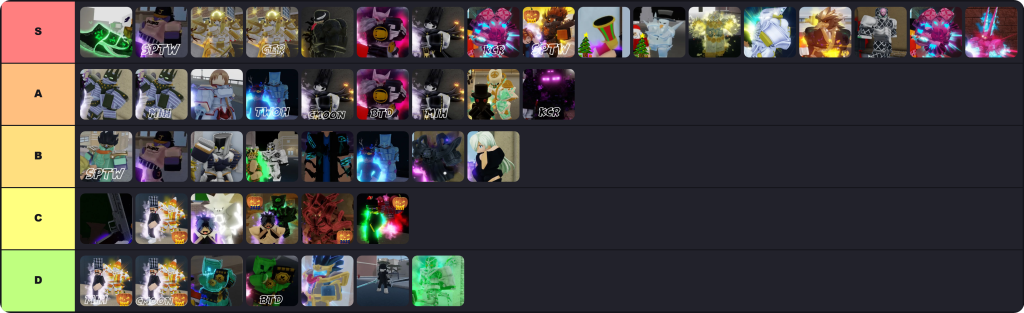
S tier usually means high demand and low supply, often tied to limited-time events (Christmas, Halloween) or very low drop rates. A tier covers skins that are solidly desirable but easier to obtain than S tier. B and C tier are the middle ground, decent, tradeable, but not chased after. D tier (sometimes F) is the common reskins everyone already has, worth little in a trade even if you personally like how they look.
Trading value vs. looks: why they’re different rankings
This is the part almost nobody spells out clearly. A trading-value ranking answers “what can I get for this in a trade.” A looks-based ranking answers “which skin would I actually want to use.” They are not the same list, and treating them as one is exactly why arguments break out in trading Discords over whether a skin is “actually good.” If you’re trading, value matters. If you’re just playing for yourself, it doesn’t matter at all, use whatever skin you like the look of, since skins have zero effect on combat. The custom-tier feature on the template above exists specifically so you can build both lists side by side instead of arguing about which framework is the “correct” one.
Highest-Value YBA Skins Right Now
Rather than dumping every skin into an unreadable table, here’s a plain-language look at what’s currently sitting at the top of the trading value ranking, based on rarity and sustained community demand.
Skins tied to limited seasonal events tend to hold the highest value long-term, since they can’t be re-obtained once the event ends. Skins like Mirage of Phantoms, Made in Christmas Future, and Horseman of Heaven consistently sit near the top for this reason, they were tied to past holiday events and are no longer obtainable through normal means. Go/Jo and Grim Reaper round out the current high end, valued for a mix of low drop rate and steady demand rather than any single event tie-in.
Below that, a wide middle tier of skins (things like Festive Platinum, Tomb Crypt Tusk, and King Krampus) trade reasonably well but fluctuate more, since new content or a shift in community taste can bump them up or down a tier within a few weeks. If you want to see exactly where a specific skin lands today rather than relying on a snapshot in an article, that’s what the live template above is for, drag it in and compare it directly against skins you already know the value of.
Newest and limited-time skins to watch
New skins usually enter the game through the arcade shop, direct Robux purchase, or event-specific chests, and their value is genuinely unstable for the first few weeks after release. A brand new skin can debut at a moderate value and then spike once people realize it’s tied to a short event window that’s about to close. If a skin was added as part of a Christmas, Halloween, or other seasonal update, it’s worth checking whether that event has already ended, since that single fact usually predicts whether the skin’s value is about to climb or has already peaked.
How Skin Rarity and Value Actually Work in YBA
Do skins affect gameplay?
No. Skins in YBA are purely cosmetic reskins of existing Stands. A Star Platinum skin doesn’t hit harder or move faster than base Star Platinum, it just looks different. Every ranking discussed here, including the template above, is about appearance and trade value, not combat performance.
How do you get a new skin?
The most common way is a Lucky Arrow, which gives a roughly 95% to 100% chance of producing a skin depending on your current pity level (pity increases slightly each time you don’t get a skin, maxing out at 10% for regular arrows and 20% for Robux rerolls, and resets once you land one). Beyond arrows, skins can also be bought directly for Robux in the shop, or rolled as part of a themed chest during limited events. If a specific skin is tied to an active event chest, waiting for that chest to reappear in the store is usually more reliable than hoping for a random pull.
Why do skin values change over time
Value isn’t fixed by the developers, it’s set by what the trading community is actually willing to pay, which shifts constantly. A new update can flood the game with a similar-looking skin and quietly tank the value of an older one. An event ending permanently removes a skin from circulation and can push its value up over the following months as supply stops growing while demand stays flat or increases. This is exactly why a tier list frozen at a single patch date becomes unreliable within a few weeks, and why building your own current ranking, rather than trusting a screenshot from months ago, is the more reliable approach.
Sharing and Comparing Your YBA Skins Tier List
Once you’ve built a ranking that actually reflects your opinion or your current trading assessment, you don’t have to keep it to yourself. The finished board can be downloaded as an image directly, useful if you want to drop it into a trading server to make your case during a negotiation. It can also be turned into a shareable link, and that link page comes with its own download button, social share buttons for platforms like Facebook, X, Reddit, and WhatsApp, emoji reactions so others can react to your list without needing to leave a full comment, an embed code if you want to drop the interactive board into a blog post or forum thread, and a comment box so people can actually argue with your placements directly on the page. None of this requires an account on either end, you can share a list and other people can react to or comment on it without signing up for anything.
If you’re working from a smaller screen, laptop or phone, every tier list template also includes a full-screen button that expands the board to fill the display, which makes dragging skins around considerably less fiddly than working in a cramped browser window.
Is This Skin Tier List Up to Date?
Static articles go stale the moment a new patch drops, and it shows: one competitor page currently labels part of its own skin data “outdated” in the heading itself. The template here is built to be updated as new skins release rather than frozen at a single version number. If you notice a skin missing from the preloaded template, an image that’s wrong, or a roster that hasn’t caught up with a recent update, every template includes a report option specifically for flagging that, whether it’s a missing image, an incorrect one, or content that’s fallen behind the game’s current patch.
For large rosters like this one, manually uploading dozens of skin images yourself would be tedious, which is why the site also offers an AI-assisted way to build a template. Copy the provided prompt into any AI tool, tell it what topic you want ranked (in this case, current YBA skins), and it returns a block of code you import back into the tier list maker to auto-generate a fresh template with the relevant items already added.
YBA Skins Tier List: Frequently Asked Questions
Do YBA skins affect combat? No. Skins are purely cosmetic. A skinned Stand has identical stats, speed, and damage to its unskinned version, the ranking only reflects appearance and trading value.
What’s the rarest YBA skin? Rarity shifts with each patch, but skins tied to permanently ended limited-time events (old Christmas or Halloween releases, for example) tend to hold the rarest status since they can no longer be earned through normal gameplay.
Do I need an account to make my own tier list? No. Creating, editing, downloading, sharing, reacting to, commenting on, embedding, and reporting a tier list all work without creating an account or logging in.
Can I add skins that aren’t in the preloaded template? Yes. Click Create to open the built-in editor and upload your own image, or draw a custom item from scratch using the pen, shape, and text tools.
How often does this skin tier list update? The template is refreshed as new skins release rather than tied to a single fixed article date. If something looks out of date, use the report option on the template to flag it.
A Quick Note on Independence
This article and the accompanying template are produced by Tier List Maker and are not affiliated with, endorsed by, or officially connected to the developers of Your Bizarre Adventure or Roblox Corporation. Skin names, values, and rarity information reflect community trading consensus, which shifts over time, and are provided for reference rather than as an official in-game valuation.
The Bottom Line YBA Skins Tier List
A frozen tier list can only tell you what someone else thought skins were worth on the day they wrote it, which is exactly why every static ranking on the first page of Google is already contradicting itself or admitting it’s outdated. The more useful move is building your own current ranking: drag the preloaded skins into tiers based on trading value or looks (or both, on separate boards), customize the tiers to match how you and your trading circle actually talk about skins, and share the finished list as a link, embed, or download when you need to make your case. Head back up to the template at the top of this page to get started, no account required.
Also Checkout Roblox Rivals Tier List Maker


![Rain_2_Survivors_Tier_List_Maker[1]](https://tier-list-maker.com/wp-content/uploads/2025/03/Rain_2_Survivors_Tier_List_Maker1.webp "Risk of Rain 2 Survivors Tier List Maker | The best Risk of Rain 2 Survivors 2026 9")
![Marvel_Rivals_Smash_Or_Pass_Tier_List[1]](https://tier-list-maker.com/wp-content/uploads/2025/02/Marvel_Rivals_Smash_Or_Pass_Tier_List1-1.webp "Marvel Rivals Smash Or Pass Tier List Maker | The best Marvel Rivals Smash Or Pass 2026 10")
Hello mates, good piece of writing and pleasant arguments commented
here, I am in fact enjoying by these.
It’s a pity you don’t have a donate button! I’d certainly donate to this
outstanding blog! I suppose for now i’ll settle for bookmarking
and adding your RSS feed to my Google account. I look forward to
new updates and will share this website with my Facebook group.
Talk soon!
Excellent beat ! I wish to apprentice at the same time as you amend your web site, how can i subscribe for a blog web site?
It’s really very complicated in this full of activity life to listen news on TV, so I just use web for that reason, and take the latest news.
It’s a pity you don’t have a donate button! I’d without
a doubt donate to this brilliant blog! I suppose for now i’ll settle for
book-marking and adding your RSS feed to my Google account.
I look forward to new updates and will talk about this tier list maker with
my Facebook group.